

A powerful community plugin for Obsidian.md that brings Git integration right into your vault. Automatically commit, pull, push, and see your changes — all within Obsidian.
All setup instructions (including mobile), common issues, tips, and advanced configuration can be found in the 📖 full documentation.
👉 Mobile users: The plugin is highly unstable ⚠️ ! Please check the dedicated Mobile section below.
- 🔁 Automatic commit-and-sync (commit, pull, and push) on a schedule.
- 📥 Auto-pull on Obsidian startup
- 📂 Submodule support for managing multiple repositories (desktop only and opt-in)
- 🔧 Source Control View to stage/unstage, commit and diff files - Open it with the
Open source control viewcommand. - 📜 History View for browsing commit logs and changed files - Open it with the
Open history viewcommand. - 🔍 Diff View for viewing changes in a file - Open it with the
Open diff viewcommand. - 🔗 GitHub integration to open files and history in your browser
🧩 For detailed file history, consider pairing this plugin with the Version History Diff plugin.
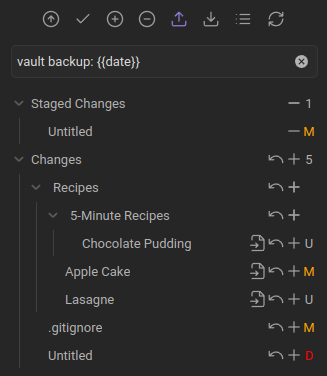
Manage your file changes directly inside Obsidian like stage/unstage individual files and commit them.
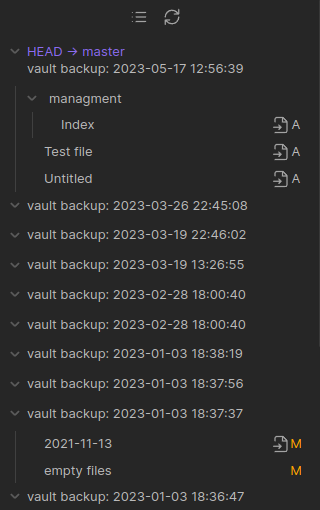
Show the commit history of your repository. The commit message, author, date, and changed files can be shown. Author and date are disabled by default as shown in the screenshot, but can be enabled in the settings.
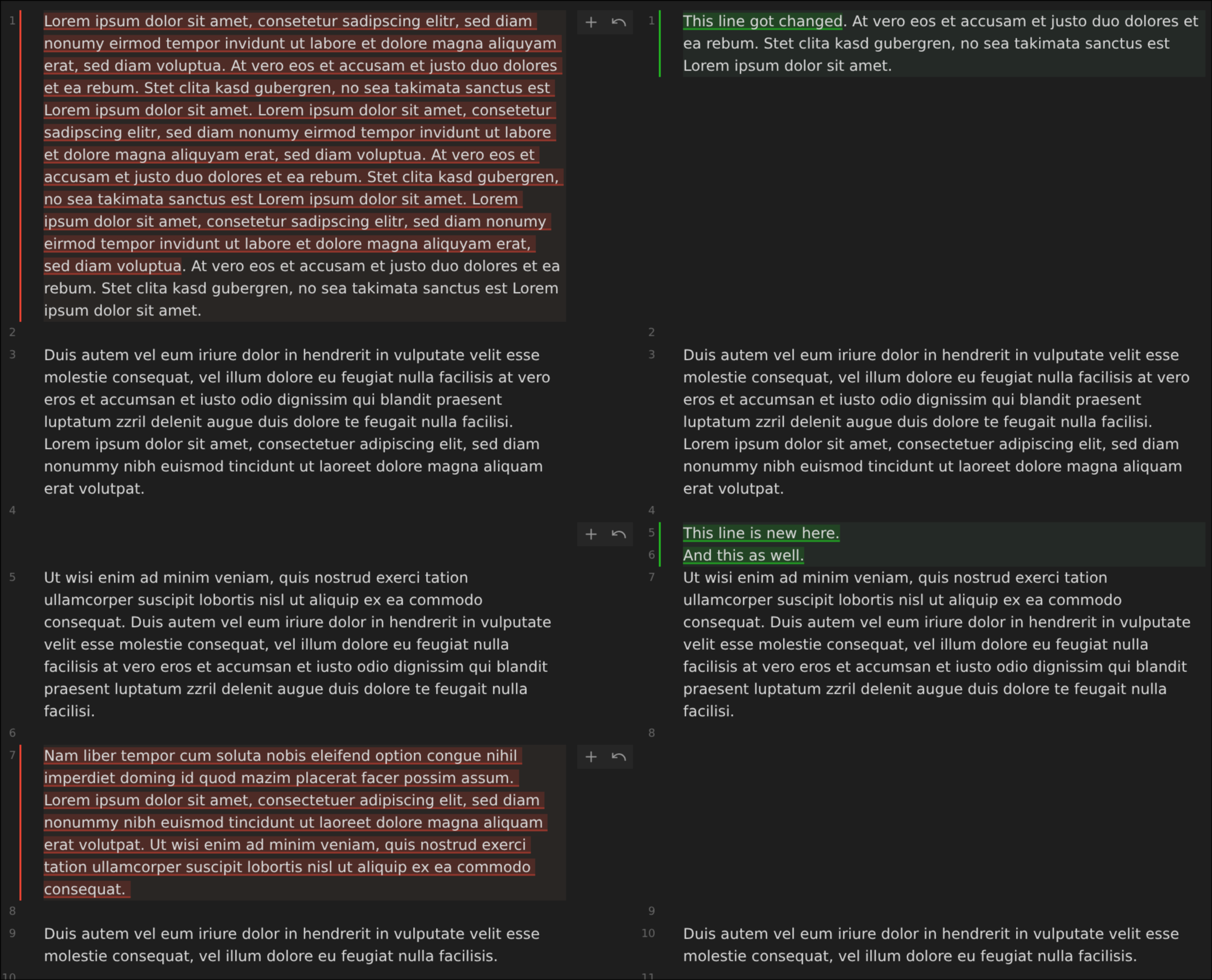
Compare versions with a clear and concise diff viewer.
Open it from the source control view or via the Open diff view command.
Not exhaustive - these are just some of the most common commands. For a full list, see the Command Palette in Obsidian.
- 🔄 Changes
List changed files: Lists all changes in a modalOpen diff view: Open diff view for the current fileStage current fileUnstage current fileDiscard all changes: Discard all changes in the repository
- ✅ Commit
Commit: If files are staged only commits those, otherwise commits only files that have been stagedCommit with specific message: Same as above, but with a custom messageCommit all changes: Commits all changes without pushingCommit all changes with specific message: Same as above, but with a custom message
- 🔀 Commit-and-sync
Commit-and-sync: With default settings, this will commit all changes, pull, and pushCommit-and-sync with specific message: Same as above, but with a custom messageCommit-and-sync and close: Same asCommit-and-sync, but if running on desktop, will close the Obsidian window. Will not exit Obsidian app on mobile.
- 🌐 Remote
Push,PullEdit remotes: Add new remotes or edit existing remotesRemove remoteClone an existing remote repo: Opens dialog that will prompt for URL and authentication to clone a remote repoOpen file on GitHub: Open the file view of the current file on GitHub in a browser window. Note: only works on desktopOpen file history on GitHub: Open the file history of the current file on GitHub in a browser window. Note: only works on desktop
- 🏠 Manage local repository
Initialize a new repoCreate new branchDelete branchCAUTION: Delete repository
- 🧪 Miscellaneous
Open source control view: Opens side pane displaying Source control viewOpen history view: Opens side pane displaying History viewEdit .gitignoreAdd file to .gitignore: Add current file to.gitignore
Some Git services may require further setup for HTTPS/SSH authentication. Refer to the Authentication Guide
- ⚠️ Snap is not supported due to its sandboxing restrictions.
- ⚠️ Flatpak is not recommended, because it doesn't have access to all system files. They are actively fixing many issues, but there are still issues. Especially with more advanced setups.
- ✅ Please use AppImage or a full access installation of your system's package manager instead (Linux installation guide)
The Git implementation on mobile is very unstable! I would not recommend using this plugin on mobile, but try other syncing services.
One such alternative is GitSync, which is available on both Android and iOS. It is not associated with this plugin, but it may be a better option for mobile users. A tutorial for setting it up can be found here.
🧪 The Git plugin works on mobile thanks to isomorphic-git, a JavaScript-based re-implementation of Git - but it comes with serious limitations and issues. It is not possible for an Obsidian plugin to use a native Git installation on Android or iOS.
- No SSH authentication (isomorphic-git issue)
- Limited repo size, because of memory restrictions
- No rebase merge strategy
- No submodules support
[!caution] Depending on your device and available free RAM, Obsidian may
- crash on clone/pull
- create buffer overflow errors
- run indefinitely.
It's caused by the underlying git implementation on mobile, which is not efficient. I don't know how to fix this. If that's the case for you, I have to admit this plugin won't work for you. So commenting on any issue or creating a new one won't help. I am sorry.
If you have a large repo/vault I recommend to stage individual files and only commit staged files.
- The Line Authoring feature was developed by GollyTicker, so any questions may be best answered by her.
- This plugin was initial developed by denolehov. Since March 2021, it's me Vinzent03 who is developing this plugin. That's why the GitHub repository got moved to my account in July 2024.
- If you have any kind of feedback or questions, feel free to reach out via GitHub issues.
If you find this plugin useful and would like to support its development, you can support me on Ko-fi.

